
Download MyFileFinder – Fast, Free, Secure File Search Tool for Windows
Looking for a reliable, lightweight, and efficient way to find files on your Windows PC? MyFileFinder is a powerful yet simple file search tool designed to help users locate files quickly by name, extension, or within specific folders. Whether you're searching for a forgotten document, a missing photo, or a particular file type across large storage drives, MyFileFinder delivers fast, accurate results without consuming excessive system resources.
This free and open-source software is perfect for everyday users, students, and professionals who value speed and simplicity in file management. With its intuitive interface and smart search algorithms, MyFileFinder adapts to your drive size and search scope, ensuring minimal wait times even on large hard drives. The ability to limit searches to specific directories makes it ideal for targeted file recovery and organization.
Best of all, there are no ads, no trial limitations, and no hidden costs—just a clean, secure, and efficient file finder.
Why MyFileFinder Stands Out Among File Search Tools
When it comes to file search utilities on Windows, many options fall short—either by being overly complex, slow, or packed with unnecessary features. MyFileFinder breaks the mold by focusing on what truly matters: speed, simplicity, and reliability. Unlike built-in Windows search, which can be inconsistent and slow when scanning large drives, MyFileFinder leverages optimized indexing and intelligent scanning to deliver results in seconds.
The tool doesn’t require installation—just download and run the portable executable, making it ideal for use on multiple devices or even from a USB drive. Its minimal footprint ensures it runs smoothly even on older systems with limited RAM or processing power. One of the standout features is the ability to filter results by file name, extension, or size, allowing for highly targeted searches.
For example, if you're looking for all .jpg files larger than 5MB, MyFileFinder can find them instantly. The interface is clean and distraction-free, with clear input fields and real-time feedback. Users can also save search profiles for recurring tasks, such as regularly finding video files or project backups.
This level of customization enhances productivity without adding complexity. Additionally, because MyFileFinder is open-source, developers and tech-savvy users can inspect the code for transparency and security, ensuring no backdoors or data collection practices. Whether you're managing a personal media library or organizing work-related documents, MyFileFinder makes file retrieval a breeze.
Key Features That Make MyFileFinder a Must-Have Tool
- Fast, Real-Time File Search – Instantly locate files by name, extension, or size with minimal delay.
- Customizable Search Scope – Limit searches to specific folders or drives to reduce scan time and improve accuracy.
- Portable & No Installation Required – Run directly from a USB drive or local folder without altering system settings.
- Open-Source & Free – No licensing fees, no ads, and full transparency through public code access.
- Lightweight & Low Resource Usage – Minimal impact on CPU and memory, ideal for older or low-end PCs.
- Supports Multiple File Types – Efficiently searches for documents, images, videos, archives, and more.
- Save & Recall Search Profiles – Store frequently used search criteria for quick access in the future.
- Secure & Privacy-Focused – No data is sent to external servers; all searches are local and private.
What truly sets MyFileFinder apart is its balance between power and simplicity. While some advanced file managers offer similar functionality, they often come with steep learning curves or bloated interfaces. MyFileFinder avoids these pitfalls by offering a streamlined experience that doesn’t sacrifice capability.
For instance, the search engine intelligently adapts to the size of your hard drive—smaller drives are scanned faster, while larger ones are processed efficiently without freezing your system. The tool also handles special characters and case sensitivity in file names, ensuring accurate results even in complex naming scenarios. Another valuable feature is the ability to copy file paths directly from search results, which is incredibly useful when you need to reference files in other applications.
Whether you're a student hunting for a research paper, a photographer sorting through thousands of images, or a developer locating configuration files, MyFileFinder streamlines the entire process. Its compatibility with Windows 7 through Windows 11 ensures broad accessibility across different user environments. With regular updates and active community support, MyFileFinder continues to evolve while staying true to its core mission: helping users find files quickly and securely.
How to Install and Use MyFileFinder on Your Windows PC
Getting started with MyFileFinder is incredibly easy—there’s no complex setup or lengthy installation process. Simply visit the official website, download the latest portable version (usually a .zip file), and extract it to your preferred folder—such as your desktop or documents directory. Once extracted, you’ll find the main executable file named MyFileFinder.exe.
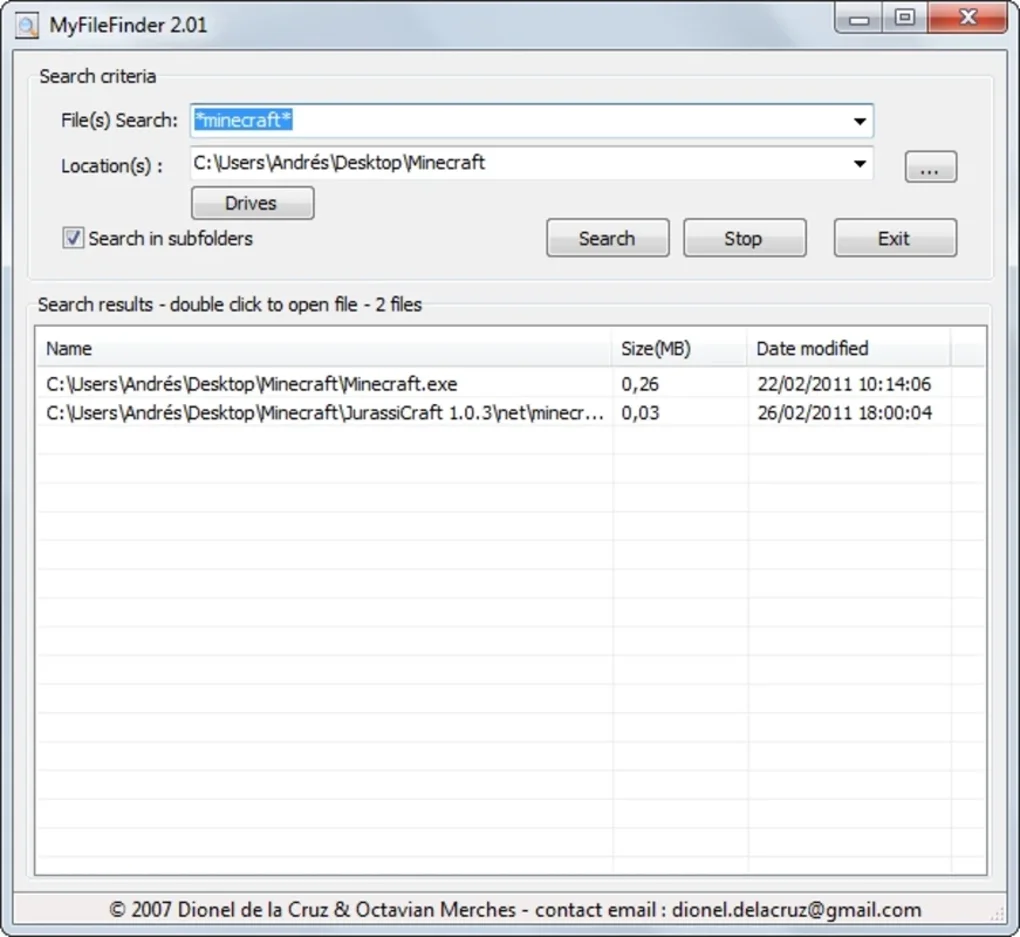
Double-click it to launch the application. The interface is minimal and intuitive: a central input field for the file name or extension, a dropdown to select the search location (e.g., C:\, D:\, or a custom folder), and a “Search” button. You can also use the “Advanced” tab to set additional filters like file size, date modified, or file type.
After clicking search, MyFileFinder begins scanning the selected drive or folder in real time. Results appear instantly in a list, showing the file name, path, size, and last modified date. Right-clicking any result allows you to open, copy the path, or explore the containing folder.
The tool doesn’t require admin rights to run, making it safe for use on restricted workstations or school computers. For frequent users, saving search profiles is a game-changer—just click “Save Profile” and give it a name like “Photos 2023” or “Project Files.” Next time, you can load the profile with one click. Updates are released regularly, and the developers provide clear changelogs to keep users informed.
Because it’s portable, you can carry MyFileFinder on a USB stick and use it on any Windows machine without leaving traces. This makes it perfect for IT professionals, students, or anyone who works across multiple devices.
Compatibility, Security, and Why It’s a Smart Choice
MyFileFinder is designed exclusively for the Windows operating system, supporting all major versions from Windows 7 SP1 up to the latest Windows 11. This broad compatibility ensures that both legacy systems and modern PCs can benefit from its powerful search capabilities. Whether you’re using a desktop, laptop, or tablet with Windows, MyFileFinder runs smoothly without requiring additional software or drivers.
The application is fully compatible with both 32-bit and 64-bit systems, ensuring universal accessibility. Security is a top priority: since MyFileFinder is open-source, its code is publicly available for review, reducing the risk of malware or privacy breaches. All searches are performed locally—no file data is uploaded or stored externally.
This makes it ideal for users handling sensitive documents, financial records, or personal media. The tool does not collect usage statistics or send telemetry data, preserving your privacy. Furthermore, because it’s free and open-source, there are no hidden in-app purchases or subscription traps.
The development team actively maintains the software, releasing regular updates to fix bugs, improve performance, and enhance compatibility. You can trust that MyFileFinder will continue to be a reliable tool for years to come. For users who value transparency, speed, and freedom from commercial constraints, MyFileFinder is an excellent alternative to paid or ad-supported file search tools.
Frequently Asked Questions (FAQ)
Final Verdict: A Lightweight, Powerful File Search Solution
If you're tired of wasting time hunting for files on your Windows PC, MyFileFinder is the solution you’ve been waiting for. With its lightning-fast search, intuitive interface, and no-strings-attached free model, it outperforms many built-in and third-party tools. Whether you’re a casual user, student, or professional, MyFileFinder simplifies file management and boosts productivity.
Its portability, privacy focus, and regular updates make it a smart, future-proof choice. Best of all, it’s completely free—no trials, no ads, no hidden fees. Download MyFileFinder today and reclaim your time.
Stop searching. Start finding.
Download Now and Experience the Fastest File Search on Windows!







